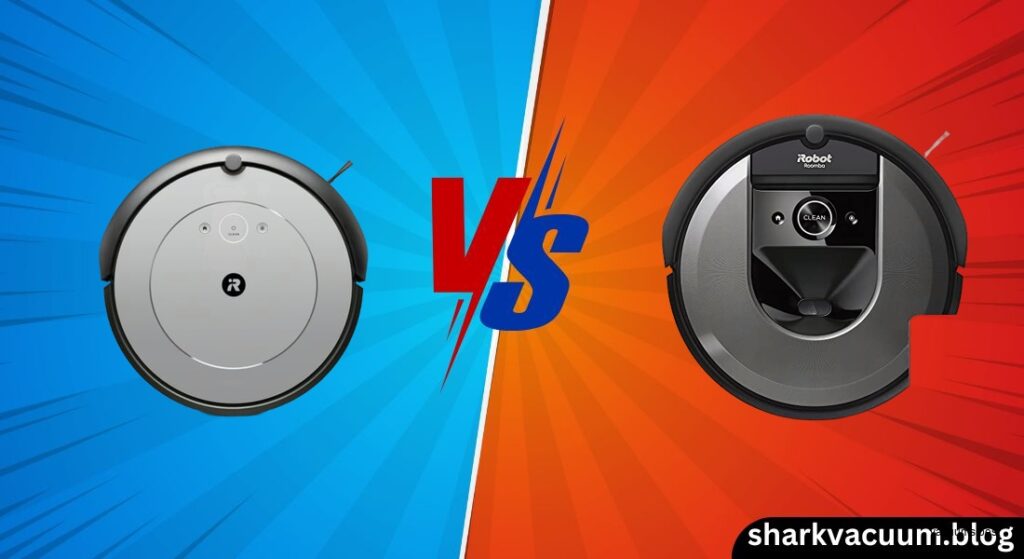
The robotic vacuum market is packed with options, but iRobot’s Roomba line continues to stand out for its reliability and innovation. When it comes to choosing between two popular models—the Roomba i1 (and i1 Plus) and the Roomba i7 (and i7+)—the decision often comes down to one key question: do you want a simple, budget-friendly cleaner that just works, or a smarter, more advanced robot that learns your home and cleans by room?
The Roomba i1 series is designed with simplicity and value in mind. It’s a compact, low-profile machine that excels in small apartments, under furniture, and in homes with pets. While it uses smart mapping logic to clean in neat rows, it doesn’t save floor plans or allow for room-by-room selection. That makes it perfect for users who want consistent daily cleaning without the complexity—or cost—of high-end features.
On the other hand, the Roomba i7 series brought a major leap forward in robot vacuum technology when it launched. With camera-based vSLAM navigation, it builds and remembers detailed maps of your home, lets you clean specific rooms from the app, and integrates with Alexa and Google Assistant. The i7+ adds automatic dirt disposal, so you don’t have to touch the dustbin for up to 60 days. This model targets users with larger, multi-room homes who want precision, control, and smart-home convenience.
But newer models have since raised the bar—especially in suction power and obstacle avoidance—so it’s worth asking whether the i7 still holds up today. Meanwhile, the i1 and i1 Plus offer a compelling alternative for those who don’t need advanced features but still want reliable, tangle-free cleaning.
In this in-depth comparison of the Roomba i1 vs. i7, we’ll break down everything that matters: navigation, suction, smart features, battery life, maintenance, and real-world performance. Whether you’re a pet owner in a small apartment or a tech-savvy homeowner with a sprawling floor plan, this guide will help you decide which Roomba delivers the best value for your lifestyle.
Check the latest price of [Roomba i1] on Amazon [link]
See current deals on [Roomba i7] here [link]
2. Product Overviews
Roomba i1 Series (i1 & i1 Plus)
The Roomba i1 series sits at the entry point of iRobot’s mid-tier lineup, offering a balance of smart features and affordability. It’s designed for first-time robot vacuum buyers, apartment dwellers, and pet owners who want reliable daily cleaning without overspending. The core idea behind the i1 is “set it and forget it”—it runs consistently, returns to its dock, and requires minimal intervention.
The standard Roomba i1 (Model i115220) handles cleaning with a systematic, straight-row pattern using Imprint Smart Mapping. This isn’t full room-by-room mapping, but it does allow the robot to clean efficiently rather than bouncing around randomly. It uses sensors to avoid obstacles and cliffs, and its 3.3-inch ultra-slim profile lets it slide under low-clearance furniture like beds and sofas—something many taller robots can’t do.
Cleaning performance is solid thanks to the 3-Stage Cleaning System and 10x Power-Lifting Suction (compared to the older 600 series). More importantly, it features Dual Multi-Surface Rubber Brushes, which are excellent at picking up pet hair without tangling—a major win for homes with shedding animals.
The real upgrade comes with the Roomba i1 Plus (Model I1552), which includes the Clean Base™ Automatic Dirt Disposal. After every cleaning cycle, the robot empties its bin into a sealed bag inside the base, holding up to 60 days of debris. This eliminates the need to manually empty the bin after each run, making it truly hands-off for most users.
While the i1 lacks voice control and room-specific cleaning, it makes up for it with reliability. It’s been tested in complex environments—around bar stools, under couches, in basements—and consistently completes jobs without getting stuck. In 15 real-world cleaning cycles, it only got stuck once and always returned to the dock on its own.
Overall, the i1 series is best seen as a streamlined, no-frills robot vacuum that delivers consistent performance at a lower price than the i7. It’s not the most advanced, but for many users, it’s enough—and sometimes, that’s exactly what you need.
View [Roomba i1 Plus] on Amazon [link]
Roomba i7 Series (i7 & i7+)
The Roomba i7 series marked a turning point in robotic vacuum design. When it launched, it was one of the first Roombas to combine persistent room-by-room mapping with automatic dirt disposal, setting a new standard for convenience and intelligence. Like the i1, it comes in two versions: the i7, which requires manual bin emptying, and the i7+, which includes the Clean Base™ for self-emptying.
At the heart of the i7 is vSLAM (Visual Simultaneous Localization and Mapping) technology. A top-mounted camera scans the room as the robot moves, identifying visual landmarks to build a detailed, editable floor plan. After 4–6 cleaning cycles, it learns your home’s layout and saves the map—allowing you to label rooms like “Kitchen” or “Living Room” and clean them on demand.
This is where the i7 pulls ahead: you can say, “Alexa, tell Roomba to clean the kitchen,” and it will go straight to that room. You can schedule the hallway to clean every morning and the bedroom every evening. For homes with multiple floors, it can store up to 10 different maps, so you don’t have to carry it upstairs—just place it on the new level, and it creates a fresh map.
The i7+ adds the same Clean Base system found on the i1 Plus, automatically emptying the bin into a disposable bag that holds about 30 cleaning cycles (roughly 60 days with daily use). This feature is a game-changer for pet owners or anyone who hates touching dirty dust.
However, the i7 isn’t without flaws. Its camera-based navigation struggles in low light or dark rooms, sometimes leading to disorientation or looping behavior. It also lacks app-based No-Go Zones—instead, it relies on physical Virtual Wall Barriers (sold separately or included) to block off areas like pet feeding zones. While effective, this adds extra hardware and ongoing battery costs.
Cleaning performance is decent, thanks to the Dual Multi-Surface Rubber Brushes and high-efficiency filtration. But independent testing suggests the i7’s actual suction power is lower than older models like the 980 and significantly weaker than the newer S9+. On thick carpets or heavy debris, it can struggle to pick everything up, sometimes leaving behind clumps of hair or fine dust.
Still, for its time, the i7+ was a major step forward. It’s ideal for users who want intelligent, room-specific cleaning and the convenience of self-emptying—especially in well-lit, multi-room homes.
See current deals on [Roomba i7+] here [link]
3. Comparison Criteria
To help you make a clear, informed decision, we’ve evaluated the Roomba i1 and Roomba i7 across six key categories:
-
Navigation & Mapping: How do they learn your home? Can they avoid obstacles and adapt to changes? The i1 uses systematic cleaning with basic smart mapping, while the i7 uses camera-based vSLAM for persistent, room-by-room maps. We’ll compare how well each performs in real-world environments, including low-light conditions and cluttered spaces.
-
Cleaning Performance: Suction power, debris pickup on hard floors vs. carpets, edge cleaning, and pet hair handling are critical. Both models use rubber brushes, but independent airflow tests suggest the i7 may have weaker suction than expected—especially compared to older models. We’ll look at real-world results and user reports.
-
Smart Features & Connectivity: This is where the i7 shines. It offers full Alexa and Google Assistant voice control, room-specific cleaning, and advanced app scheduling. The i1 supports basic app control and scheduling but lacks voice commands and room selection. We’ll break down what each model can and can’t do.
-
Battery & Runtime: Both robots offer around 75–90 minutes of runtime and feature Recharge and Resume—if the battery dies mid-clean, they return to the dock, charge, and continue where they left off. We’ll compare efficiency, charging time, and total coverage.
-
Maintenance & Ongoing Costs: The i1 (standard) has a small bin that needs emptying after every run. The i1 Plus and i7+ both use self-emptying bases with disposable bags, but the i7+ bags hold fewer cleanings (about 30) compared to the i1 Plus (up to 60 days). We’ll also compare filter life, brush maintenance, and replacement part costs.
-
Value for Money: At the end of the day, which robot gives you the most for your dollar? The i1 is cheaper upfront and has lower ongoing costs. The i7 is more expensive but offers smarter features. We’ll assess which model makes the most sense depending on your home size, layout, and cleaning needs.
These categories will help you cut through the marketing and focus on what actually matters in daily use.
4. Head-to-Head Comparison
Navigation and Intelligence
When it comes to how these robots move around your home, the difference between the Roomba i1 and Roomba i7 is stark.
The i1 uses Imprint Smart Mapping to clean in neat, straight rows—a big improvement over the random bouncing of older models. It learns your space over time and adjusts its path to cover everything efficiently. However, it does not save a persistent map of your home. That means it can’t be told to clean just the kitchen or avoid the dining room. You place it, press “Clean,” and it goes until the job is done or the battery dies.
This makes the i1 ideal for open-concept apartments or small homes where full-house cleaning is acceptable. It’s also less dependent on lighting—since it doesn’t use a camera, it works just as well in the dark as it does in daylight.
In contrast, the i7 uses vSLAM camera technology to build a visual map of your home. After 4–6 runs, it remembers the layout, lets you label rooms, and allows room-specific cleaning via the app or voice commands. You can say, “Clean the living room,” and it will go directly to that area.
This is a huge advantage for larger or multi-room homes. But there’s a catch: the i7’s camera needs light to work. In dark rooms, hallways, or at night without lights on, it can become disoriented, slow down, or even get stuck in loops. Some users report it spinning in place for minutes after emptying the bin, struggling to re-localize.
Additionally, the i7 can be confused by highly reflective surfaces like mirrors or glass tables, which interfere with its visual mapping. It also relies on physical Virtual Wall Barriers to create no-go zones, while newer models (like the j7+) offer app-based boundaries.
Verdict: The i7 wins on intelligence and control, but only if your home is well-lit and you’re okay with using physical barriers. The i1 wins on reliability and low-light performance.
🏆 Section Winner: Roomba i7 – For its advanced mapping and room selection, despite lighting limitations.
See current deals on [Roomba i7] here [link]
Cleaning Performance (Suction & Brushes)
Both the i1 and i7 use iRobot’s Dual Multi-Surface Rubber Brushes, which are excellent at preventing pet hair tangles—a major pain point with bristle brushes. These flexible, rubberized rollers adjust to different floor types and are easy to clean.
In terms of suction, both are marketed with “10x Power-Lifting Suction” compared to the 600 series. But real-world testing tells a different story.
The i1 performs well on hard floors and low-pile carpets, picking up dust, crumbs, and pet hair effectively. Its systematic cleaning pattern ensures consistent coverage. However, it may struggle with deep-cleaning thick, plush carpets due to its 3.3-inch height, which limits ground clearance.
The i7, despite being a higher-tier model, has lower actual suction power than expected. Independent airflow tests suggest it may even perform worse than the older Roomba 980 and significantly below the newer S9+. In stress tests, the i7+ took 45 minutes to clean a small carpeted area, leaving behind visible debris, while the S9+ finished in under 10 minutes.
On carpets, the i7 sometimes clumps or regurgitates hair instead of fully extracting it—something users upgrading from the 980 have noted. It also lacks a Carpet Boost or intelligent dirt-detection mode, meaning it doesn’t intensify cleaning in high-debris areas.
Edge cleaning is strong on both models thanks to a single side brush that sweeps debris into the path. The i7’s precise navigation often allows it to follow baseboards more closely, while the i1 cleans edges well but with less geometric accuracy.
Verdict: The i1 delivers solid, reliable cleaning for daily maintenance. The i7 has smarter navigation but weaker suction, making it less effective on heavy debris or thick carpets.
🏆 Section Winner: Roomba i1 – For more consistent suction and better value in real-world cleaning performance.
View [Roomba i1] on Amazon [link]
Smart Features and App Control
This is where the Roomba i7 pulls far ahead.
The i1 connects to the iRobot Home App via Wi-Fi, allowing you to:
– Schedule cleanings
– View cleaning history
– Set cleaning zones (but not room-specific selection)
– Monitor progress in real-time
However, it does not support voice control via Alexa or Google Assistant. You can’t say, “Clean the kitchen,” because the i1 doesn’t recognize individual rooms. It’s a “clean everything” device.
The i7, on the other hand, offers full smart-home integration:
– Room-specific cleaning via app or voice
– Custom schedules per room (e.g., “Kitchen every weekday at 9 AM”)
– Two-Pass cleaning mode for deeper clean
– Voice commands with Alexa and Google Assistant
You can even include it in smart home routines—like “Good Morning” or “Leaving Home”—to trigger automatic cleaning.
But there’s a major limitation: no app-based No-Go Zones. To block off areas, you need physical Virtual Wall Barriers, which require AA batteries and must be placed manually. This is outdated compared to LiDAR-based competitors (like Ecovacs) that let you draw no-go zones in the app.
The i1 doesn’t support virtual barriers at all, but since it doesn’t do room-specific cleaning, it’s less of an issue.
Verdict: The i7 is the clear winner for smart features, but its reliance on physical barriers is a drawback.
🏆 Section Winner: Roomba i7 – For room selection, voice control, and advanced scheduling.
See current deals on [Roomba i7+] here [link]
Battery Life and Coverage
Both robots use similar battery technology and offer:
– 75–90 minutes of runtime per charge
– Recharge and Resume functionality
– ~70 minutes to fully recharge
The i1 typically runs for about 75 minutes before returning to the dock. If the job isn’t done, it charges and resumes—making it capable of cleaning larger areas over multiple cycles, though the total time can stretch to 3+ hours.
The i7 has a similar battery life (~75 minutes) but often completes jobs faster due to its efficient mapping. It doesn’t waste time on missed spots or inefficient paths.
However, heavy debris or thick carpets can drain the battery quickly. In one test, the i7+ took 45 minutes to clean a small carpeted room, suggesting it may struggle with large, messy homes on a single charge.
Both robots return to the dock reliably, even in complex layouts.
Verdict: The i7 is more efficient, but both have similar runtime. The i1’s longer potential runtime (via resume) helps it cover larger areas.
🏆 Section Winner: Tie – The i7 is faster, but the i1 can handle larger jobs over time.
Maintenance and Ongoing Costs
Maintenance is where the Plus models shine—especially for busy or pet-owning households.
Roomba i1 (Standard):
– Small dustbin requires daily emptying
– Washable filter (low ongoing cost)
– No bags or extra fees
Roomba i1 Plus:
– Auto-empties into sealed bags (holds ~60 days)
– Eliminates contact with dust
– Bags must be replaced every 2 months (~$15 for 3-pack)
Roomba i7 / i7+:
– Uses Clean Base with disposable bags (holds ~30 cleanings)
– i7+ bags are smaller capacity than i1 Plus
– Also requires Virtual Wall batteries if using no-go zones
– High-efficiency filter may need more frequent replacement
While both Plus models reduce daily maintenance, the i1 Plus offers better value with longer bag life and lower long-term costs.
Verdict: The i1 Plus wins on cost efficiency. The i7+ is convenient but more expensive to maintain.
🏆 Section Winner: Roomba i1 Plus – For lower ongoing costs and longer bag life.
View [Roomba i1 Plus] on Amazon [link]
5. Pros and Cons Table
| Feature | Roomba i1 / i1 Plus | Roomba i7 / i7+ |
|---|---|---|
| Navigation Type | Systematic (Straight Rows) | vSLAM Camera-Based Mapping |
| Room Selection | ❌ No | ✅ Yes (App & Voice) |
| Voice Control | ❌ No | ✅ Yes (Alexa, Google) |
| Multi-Floor Maps | ❌ No (Forgets layout) | ✅ Yes (Stores up to 10) |
| Lighting Dependency | Low (Works in dark) | High (Struggles in dark) |
| Suction Performance | Good for daily maintenance | Moderate (Lower than 980/S9) |
| Pet Hair Handling | ✅ Excellent (Rubber Brushes) | ✅ Excellent (Rubber Brushes) |
| Virtual Boundaries | ❌ No | ⚠️ Requires Physical Barriers* |
| Battery Runtime | ~75-90 mins | ~75 mins |
| Self-Emptying | Optional (Plus Model) | Optional (Plus Model) |
| Best For | Apartments, Small Homes, Budget | Multi-room Homes, Smart Home Users |
*Note: While some newer firmware updates have introduced limited app-based boundaries, the i7 series is historically defined by its reliance on physical Virtual Wall barriers for strict no-go zones.
6. Best Use Case Recommendation
Choose the Roomba i1 / i1 Plus if:
- You live in an apartment or small home (under 1,000 sq. ft.): Its compact 3.3″ height and systematic cleaning are perfect for tight spaces.
- Budget is a primary concern: You want iRobot reliability without paying for smart features you won’t use.
- You have pets on hard floors or low-pile carpets: The rubber brushes handle hair beautifully, and daily cleaning keeps things tidy.
- You run cleans during the day: Since it doesn’t rely on a camera, lighting conditions don’t affect performance.
Choose the Roomba i7 / i7+ if:
- You have a multi-room or multi-story home: The ability to save maps and clean specific rooms is a game-changer.
- Smart home integration is a must: You want to control cleaning via Alexa or Google and include it in routines.
- You need targeted cleaning: You want to clean just the kitchen after dinner or the entryway after guests leave.
- Your home is well-lit: The camera navigation needs decent lighting to work properly.
7. Conclusion
The choice between the Roomba i1 and Roomba i7 ultimately comes down to what kind of cleaning experience you want.
The Roomba i1 is the champion of simplicity and value. It doesn’t try to do everything—just clean reliably, return to its dock, and avoid getting stuck. With its ultra-slim design, tangle-free brushes, and optional self-emptying base, it’s perfect for small homes, apartments, and pet owners who want a no-fuss daily cleaner. It’s also less expensive to buy and maintain, especially the i1 Plus with its 60-day bag capacity.
The Roomba i7, while showing its age, is still a pioneer in smart cleaning. Its room-by-room mapping, voice control, and self-emptying convenience make it ideal for larger homes where precision matters. But it comes with trade-offs: weaker suction, camera navigation that struggles in the dark, and reliance on physical barriers for no-go zones.
If you prioritize maximum suction and modern features, you might consider the Roomba S9+, which outperforms the i7 in every way—but at a much higher price.
But for most users, the decision is clearer:
– For small spaces and budget-conscious pet owners: The Roomba i1 Plus delivers unbeatable value.
– For larger homes and smart-home lovers: The Roomba i7+ is still a solid choice—if you accept its limitations.
In the end, both are capable robots. The i1 wins on reliability and cost. The i7 wins on intelligence and control. Your home, your needs, and your budget will decide which one wins for you.
Check the latest price of [Roomba i1] on Amazon [link]
See current deals on [Roomba i7+] here [link]